Creating a new INodeStyle composed of different existing ones
Tips & TricksSummary
INodeStyle as a combination of other existing INodeStyles.Description
yFiles FLEX offers a wide range of different styles for graph elements like nodes, edges or labels. But of course it can't provide all kind of styles anyone could imagine. If you have a specific style in mind which isn't covered by the default styles in yFiles FLEX you can either subclass an existing style, write a completely new style or try to combine some of the existing styles.
In this case we want to write a CompositeNodeStyle which can be used as a composite to which any number of other existing INodeStyles can be added.
The following code shows how such a style could look like:
package demo.grid {
import com.yworks.canvas.CanvasComponent;
import com.yworks.canvas.ICanvasObjectGroup;
import com.yworks.canvas.model.IModelItem;
import com.yworks.graph.drawing.INodeStyle;
import com.yworks.graph.drawing.IStyleRenderer;
import com.yworks.support.ArrayList;
import com.yworks.support.Iterator;

/**
 * This NodeStyle can be used to combine several other NodeStyles to create a new style.
 */
public class CompositeNodeStyle implements INodeStyle{

    private var _styles:ArrayList = new ArrayList();

    private var _renderer:CompositeNodeStyleRenderer;

    public function CompositeNodeStyle(renderer:CompositeNodeStyleRenderer = null) {
        this._renderer = (renderer == null) ? new CompositeNodeStyleRenderer() : renderer;
    }

    public function install(canvas:CanvasComponent, group:ICanvasObjectGroup, modelItem:IModelItem):Array {
        return this._renderer.install(canvas, group, modelItem);
    }

    public function get styleRenderer():IStyleRenderer {
        return this._renderer;
    }
    public function clone():Object {
        var result:CompositeNodeStyle = new CompositeNodeStyle(this._renderer);
        result.styles = this.styles;
        return result;
    }

    public function addStyleAt(style:INodeStyle, position:uint):void {
        if (position <= this._styles.length()) {
            this._styles.insert(style, position);
        }
    }

    public function get styles():ArrayList {
        return _styles;
    }
    public function set styles(val:ArrayList):void {
        _styles = val;
    }
}
}
In addition to implementing the INodeStyle interface, the class offers functions to add styles at specific positions and a getter and setter for a list of all composed styles.
The style uses a custom INodeStyleRenderer called CompositeNodeStyleRenderer which does the major part of the work for combining the styles. It has to override the functions createDisplayObject, calculateBounds, isHit, isInBox, lookup, getIntersection, isInside and getOutline to account for all sub styles used. Therefore it has to call the equivalent methods of the sub styles and combine their results.
In case of the createDisplayObject method this means to get the IDisplayObjectCreator of each style and call it's createDisplayObject method:
override public function createDisplayObject(context:IDisplayObjectContext):DisplayObject {
  var comNS:CompositeNodeStyle = this.style as CompositeNodeStyle;
  var base:YDisplayObject = new YDisplayObject();
  if (comNS != null) {
    var styleIt:Iterator = comNS.styles.iterator();
    while (styleIt.hasNext()) {
      var style:INodeStyle = styleIt.next() as INodeStyle;
      var dObj:DisplayObject = style.styleRenderer.getDisplayObjectCreator(item, style).createDisplayObject(context);
      base.addChild(dObj);
    }
  }
  return base;
}
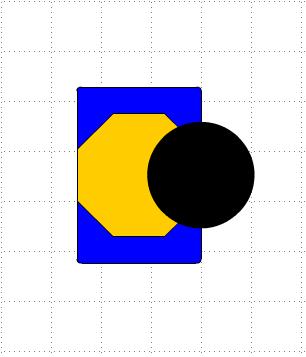
As an example we want to use a style composed of three ShapeNodeStyles. As we don't want them to be stacked exactly on top of each other we subclass the ShapeNodeStyle and it's ShapeNodeStyleRenderer to be able to override the renderer's layout getter.
Our VariableBoundsShapeNodeStyle allows to set a percentual horizontal and vertical offset as well as a width and height ratio. The renderer uses these settings to modify the layout of the style:
override public function get layout():IRectangle {
    var style:VariableBoundsShapeNodeStyle = this.style as VariableBoundsShapeNodeStyle;
    if (style != null) {
        var x:Number = super.layout.x + super.layout.width * style.xOffset;
        var y:Number = super.layout.y + super.layout.height * style.yOffset;
        var width:Number = super.layout.width * style.widthRatio;
        var height:Number = super.layout.height * style.heightRatio;

        return new YRectangle(x, y, width, height);
    } else {
        return super.layout;
    }
}
This way we can easily define how the composed style should look like:
var compNS:CompositeNodeStyle = new CompositeNodeStyle();
  var vbshs1:VariableBoundsShapeNodeStyle = new VariableBoundsShapeNodeStyle(
             null, ShapeNodeShape.ROUND_RECT, null, Fills.BLUE, 0, 0, 0.7, 1);
  var vbshs2:VariableBoundsShapeNodeStyle = new VariableBoundsShapeNodeStyle(
             null, ShapeNodeShape.OCTAGON, null, Fills.ORANGE, 0, 0.15, 0.7, 0.7);
  var vbshs3:VariableBoundsShapeNodeStyle = new VariableBoundsShapeNodeStyle(
             null, ShapeNodeShape.ELLIPSE, null, Fills.BLACK, 0.4, 0.2, 0.6, 0.6);

  compNS.addStyleAt(vbshs1, 0);
  compNS.addStyleAt(vbshs2, 1);
  compNS.addStyleAt(vbshs3, 2);
  graphCanvas.graph.defaultNodeStyle = compNS;
The result looks like the following:
yFiles FLEX 1.6 and before: Using the IPaintable interface
Before yFiles FLEX 1.7 the style renderers had to return IPaintable implementations instead of IDisplayObjectCreator. That means in older yFiles FLEX versions the CompositeNodeStyleRenderer has to override the paint method instead of createDisplayObject. The paint method has to retrieve the IPaintable of each style and call it's paint method:
override public function paint(g:YGraphics, ctx:IPaintContext):void {
    var comNS:CompositeNodeStyle = this.style as CompositeNodeStyle;
    if (comNS != null) {
        var styleIt:Iterator = comNS.styles.iterator();
        while (styleIt.hasNext()) {
            var style:INodeStyle = styleIt.next() as INodeStyle;
            style.styleRenderer.getPaintable(item, style).paint(g, ctx);
        }
    }
}