Why a Node Label Exceeds the Width of its Node at Certain Zoom Levels
Questions & AnswersSummary
Node labels can exceed the width of theirs node, depending on the current zoom level.
Description
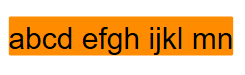
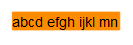
yFiles for HTML relies on the browser's SVG font rendering to scale the text of node labels based on the GraphComponent's current zoom level. Because of font hinting, the glyph sizes and the spacing between them do not scale linearly with the zoom level. As a result, the relative width of the text can vary at different zoom levels. This can cause a node label to appear wider than its node when the zoom level is changed.
The visibility of this effect depends on the zoom value, the font being used, and the browser. The images below show an example label in Firefox 53 on Windows 10.

Workarounds
- Set the text-rendering CSS property to geometricPrecision on the GraphComponent's
<div>element. See the MDN article for more information about this property and its possible disadvantages. - Reserve additional margins around your text to accommodate potential size variations.
- Add a clip-path CSS property to your
<text>element to clip the text to the desired bounds. For example, the following SVG snippet restricts the text to a size of 100x16.
<g transform="translate(0 0)">
  <text font-family="Arial" font-size="12px" font-style="normal" font-weight="normal"
      text-anchor="start" fill="rgb(50,50,50)" fill-opacity="1" dy="1em" transform="translate(0 0)"
      clip-path="url(#ygc1_41)">abcd efgh ijkl mnop qrst</text>
  <clipPath id="ygc1_41">
    <rect x="-0" y="-0" width="100" height="16"></rect>
  </clipPath>
</g>
Resources
Categories this article belongs to:
yFiles for HTML > Other
Applies to:
yFiles for HTML: 1.0, 1.1, 1.2, 1.3, 1.4, 2.0, 2.1, 2.2, 2.3, 2.4, 2.5, 2.6, 3.0, 3.1
Keywords:
label - text - zoom - font hinting - font size - rendering